


Nintendo Switch Accessories Buying Guide

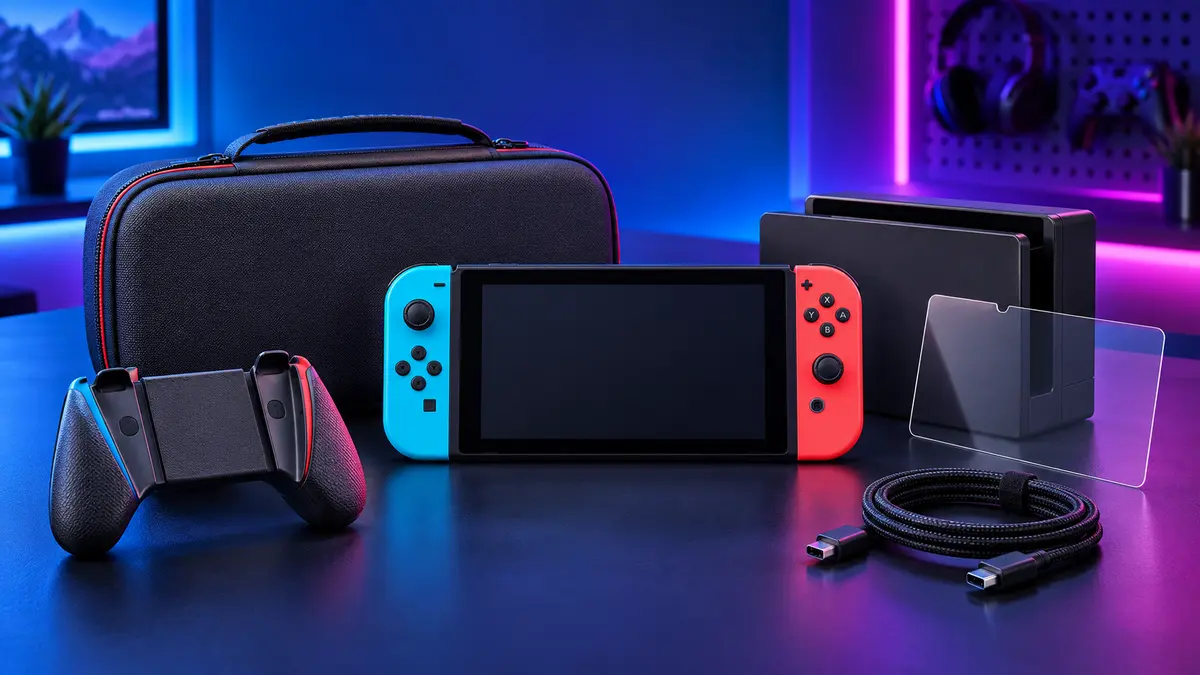
The right Nintendo Switch accessories can make your console easier to carry, more comfortable to use and better protected during everyday play. The challenge is deciding which products are genuinely useful and which ones simply add clutter. This buying guide explains the main accessory categories, what to check before ordering and how to build a practical setup around the way you play.
Start With Your Nintendo Switch Model
Compatibility should be your first consideration. Nintendo Switch, Switch OLED, Switch Lite and newer-generation models may use different dimensions, ports, docks and protective shells. An accessory that looks similar may still block a vent, fit too loosely or prevent the console from docking correctly.
Before buying a case, screen protector, charging dock or grip, check the exact console model listed on the product page. For accessories that connect electronically, confirm the connector type and supported charging method as well. Model-specific protection products should fit precisely, while universal items such as stands and cables still need the correct size and power specification.
1. Protective Cases and Screen Protection
A protective case is one of the most useful first purchases because handheld consoles are exposed to scratches, bumps and accidental drops. A slim shell is suitable for everyday use at home, while a reinforced case offers more protection for travel or younger users.
- Clear shells preserve the original appearance of the console.
- Grip cases add shaped handles for better comfort during longer sessions.
- Rugged cases use thicker corners and impact-resistant materials.
- Screen protectors reduce scratches from transport, cleaning and repeated docking.
Choose a shell that leaves the ventilation openings, buttons, speakers and charging port unobstructed. If you frequently use the official dock or a third-party dock, confirm that the case is dock-compatible. For screen protectors, accurate cutouts and an edge-to-edge fit are more important than unnecessary thickness.
2. Carrying Cases for Travel and Storage
A good carrying case keeps the console and its small accessories together. Look for a semi-hard exterior, a soft inner lining and a secure console compartment. Elastic straps or a padded divider help prevent the device from moving during transport.
Storage capacity should match your routine. A compact case may hold the console, game cards and a short charging cable. A larger travel case can also store controllers, a power adapter, a charging dock and other accessories. Avoid overfilling the case, because pressure from chargers or hard accessories can press against the screen.
3. Charging Docks, Cables and Power Accessories
Charging accessories are valuable for households with several controllers or for players who want a tidy setup. A controller charging dock keeps devices in one place and reduces the number of loose cables on a desk. Some stands combine charging, controller storage and console organization.
When comparing charging products, check the input requirements, included cable and charging indicators. Stable connectors and overcharge protection are preferable for regular use. If you need an extra cable, choose the correct connector and an appropriate length for your desk, television or travel bag.
4. Controller Grips and Comfort Accessories
Small controllers are convenient, but they may feel uncomfortable during long gaming sessions. Controller grips add larger handles and can make the controls feel more natural. Thumb grips can improve traction, while steering-wheel attachments and sports grips can make motion-based games easier to play with friends.
Comfort is personal, so consider hand size and preferred games. A lightweight grip is suitable for casual and portable play. A larger ergonomic grip may be better for action games and longer sessions. Make sure the accessory holds the controllers securely without pressing the release buttons or interfering with wireless functions.
5. Stands, Docks and Desk Organization
A tabletop stand raises the screen to a more comfortable viewing angle and can improve airflow around the console. Adjustable stands are useful when several people share the display or when you alternate between sitting and standing. If the stand includes charging, confirm that the port is aligned correctly and that the console remains stable while connected.
For a television setup, a compact dock, controller holder and cable organizer can keep the area clean. Choose accessories with non-slip bases so that devices do not move when controllers are removed or cables are connected.
How to Prioritize Your Budget
You do not need every accessory at once. A simple order of priority works for most players:
- Protection: screen protector and protective case.
- Transport: carrying case if the console leaves home.
- Charging: an extra cable or multi-controller charging dock.
- Comfort: controller grips or thumb caps.
- Organization: stands, storage holders and cable management.
Buy around a real need rather than a long feature list. A well-fitting case or reliable charging dock usually provides more everyday value than a complicated accessory that is rarely used.
Nintendo Switch Accessory Buying Checklist
- Confirm the exact console or controller model.
- Check dimensions, ports, ventilation openings and dock compatibility.
- Review the materials and level of protection.
- Confirm what cables, adapters or mounting parts are included.
- Choose storage capacity based on what you actually carry.
- Look for stable construction, smooth edges and easy installation.
Frequently Asked Questions
Are Nintendo Switch accessories compatible with every model?
No. Cases, screen protectors, docks and some grips are model-specific. Always check the product compatibility list before ordering.
Which Nintendo Switch accessory should I buy first?
For most players, a screen protector and protective carrying case provide the best starting point. Add charging and comfort accessories based on your play routine.
Can I leave controllers on a charging dock?
Use a dock designed for the correct controller type and follow its charging instructions. Quality docks with charging protection are better suited to regular storage and charging.
What should I look for in a travel case?
Choose a case with a semi-hard exterior, soft lining, secure console straps and enough compartments to prevent chargers or controllers from pressing against the screen.
Build a Better Nintendo Switch Setup
The best accessory setup is the one that protects your console and supports the way you actually play. Start with model compatibility, then add protection, charging, comfort and storage in that order. Explore our Nintendo accessories to compare practical options for home, travel and multiplayer gaming.
Compatibility note: Product names are used to describe device compatibility. Always confirm the exact model before purchase.