



Best PlayStation Accessories for Your Setup

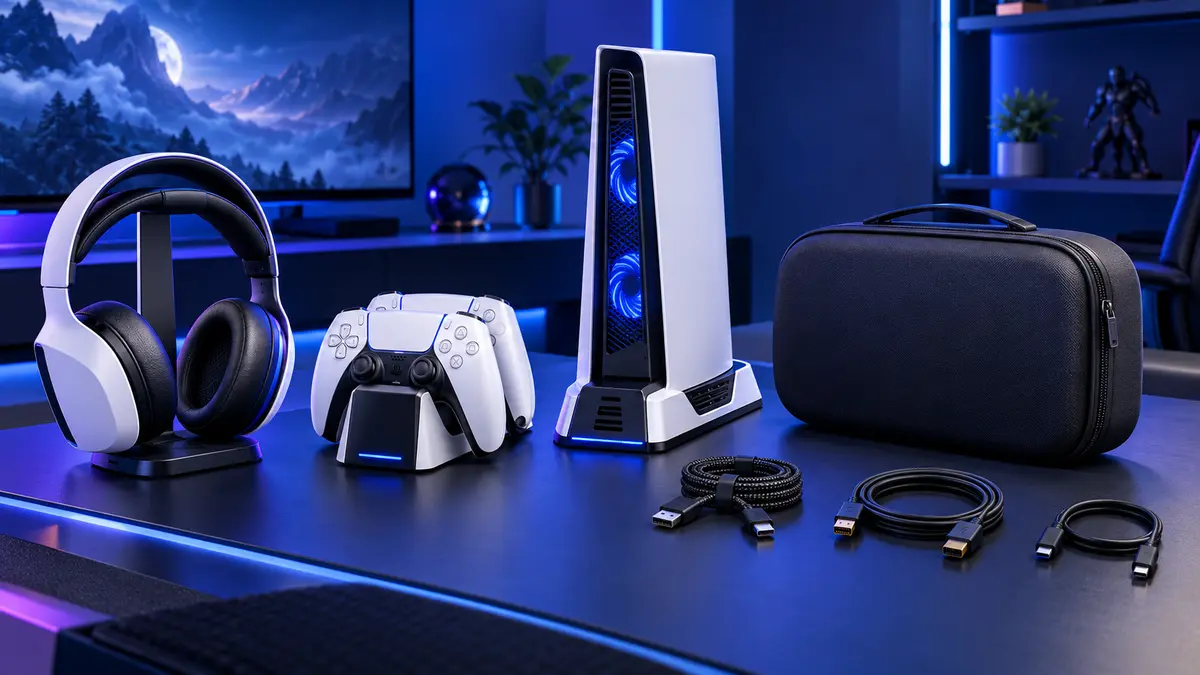
A good PlayStation setup is not defined by the number of accessories on the desk. It is defined by convenience: controllers are charged, cables are organized, the console has enough airflow and the equipment feels comfortable during long sessions. This guide covers the most useful PlayStation accessories and explains how to choose products that fit your console, room and gaming habits.
Check PS5 and PS4 Compatibility First
PlayStation accessories are often designed for one console generation or one controller model. Charging contacts, stand shapes, cable connectors and console dimensions can differ. Before ordering, confirm whether the product supports PS5, PS5 Slim, PS4 or the exact controller version you use.
Physical compatibility matters even for products that do not connect electronically. A vertical stand should match the console body, a dust cover should allow the correct fit and a controller case should not press the sticks or triggers. For charging products, check the required power input and whether the cable or adapter is included.
1. Controller Charging Docks
A charging dock is one of the easiest ways to improve a PlayStation setup. Instead of connecting a cable after every session, you can place the controller on a dedicated base. Dual-controller docks are especially useful for multiplayer households or players who rotate between two controllers.
Look for secure contact points, clear charging indicators and a stable non-slip base. The controller should sit naturally without being forced into position. If the dock uses an adapter or removable connector, keep the small parts organized so they do not get lost.
2. Cooling Stands and Console Organization
Many multifunction stands combine console storage, controller charging, headset storage and game organization. These products can reduce clutter, but the design should never block the console’s ventilation openings. Leave enough space around the console and follow the manufacturer’s placement guidance.
A stand is most useful when it solves a specific layout problem. Vertical stands save desk width, while horizontal stands may fit better inside a media cabinet. Choose a base that supports the console securely and does not wobble when cables are connected.
3. Headsets and Headset Stands
A comfortable headset can improve communication and help you notice directional audio. When choosing one, consider fit, microphone clarity, connection type and how long you normally play. Over-ear cushions should feel comfortable without excessive pressure, and the headband should adjust securely.
A headset stand is a simple addition that keeps the headset away from the floor and prevents the cable from tangling. Some stands include USB ports or lighting, but stability and convenient placement are more important than decorative features.
4. Controller Grips, Thumb Caps and Trigger Accessories
Small controller accessories can make a noticeable difference. Textured thumb caps improve grip and protect the original stick surface. Silicone covers add traction and reduce scratches, while trigger extensions may help players who prefer a larger contact area.
Choose accessories that fit tightly without restricting stick movement or pressing nearby buttons. Different thumb-cap heights suit different game types, so a mixed set can be useful for testing. Comfort is subjective; start with a simple, removable option before changing the feel of every control.
5. Storage Cases and Travel Protection
Controller cases protect the sticks, triggers and charging port during travel or storage. A molded interior offers better support than a loose pouch. For larger setups, a console travel case can hold the console, controllers, cables and headset in separate compartments.
Do not choose a case only by its outside dimensions. Check the internal layout, padding and cable compartments. Heavy adapters should be separated from the controller and console surfaces to prevent pressure or scratches.
6. Cables, Adapters and Replacement Parts
Extra charging cables are useful at a desk, beside a sofa or in a travel bag. Choose the correct connector and enough length without creating unnecessary cable loops. Cable clips and sleeves can keep power, display and charging cables separated.
Replacement parts such as controller charging connectors, battery covers and small stands can extend the useful life of a setup. Confirm model compatibility carefully, especially when product names look similar across console generations.
Three Practical PlayStation Setup Ideas
Compact Desk Setup
Use a stable vertical stand, dual-controller charging dock, headset hook and short cable organizer. This keeps the equipment accessible without using much desk space.
Living Room Setup
Choose a low-profile charging dock, controller storage holder and covered cable route. A small accessory basket can keep charging cables, thumb grips and remote controls together.
Travel Setup
Prioritize a padded controller case, correctly sized console bag, compact charger and labeled cables. Pack hard accessories in separate compartments so they cannot press against the console.
PlayStation Accessory Buying Checklist
- Confirm the console and controller generation.
- Check charging input, connectors and included cables.
- Keep console vents clear and allow airflow.
- Choose stable stands with non-slip bases.
- Check internal case dimensions and protective padding.
- Prioritize comfort and practical organization over unnecessary features.
Frequently Asked Questions
What is the most useful PlayStation accessory?
A controller charging dock is a useful first upgrade for many players because it keeps controllers organized and ready to use. Protection and audio accessories should follow your own needs.
Do PS4 accessories work with PS5?
Some universal accessories may work, but many stands, cases, charging docks and controller products are model-specific. Check the stated compatibility before purchase.
Does every PlayStation setup need a cooling stand?
No. Good ventilation and correct console placement are the priority. A stand may help with organization, but it should not block airflow or replace proper maintenance.
How do I keep my gaming area organized?
Give each item a fixed place: console stand, controller dock, headset holder and cable route. A simple arrangement is easier to maintain than a large multifunction station that does not fit your space.
Choose Accessories That Improve Everyday Play
Start with the problems you want to solve: dead controllers, loose cables, limited desk space, uncomfortable controls or poor travel protection. Then choose accessories designed for your exact model. Browse our PlayStation accessories for practical charging, storage, protection and setup solutions.
Compatibility note: Product names are used to describe device compatibility. Always confirm the exact model before purchase.
