



VR & Handheld Gaming Accessories Guide

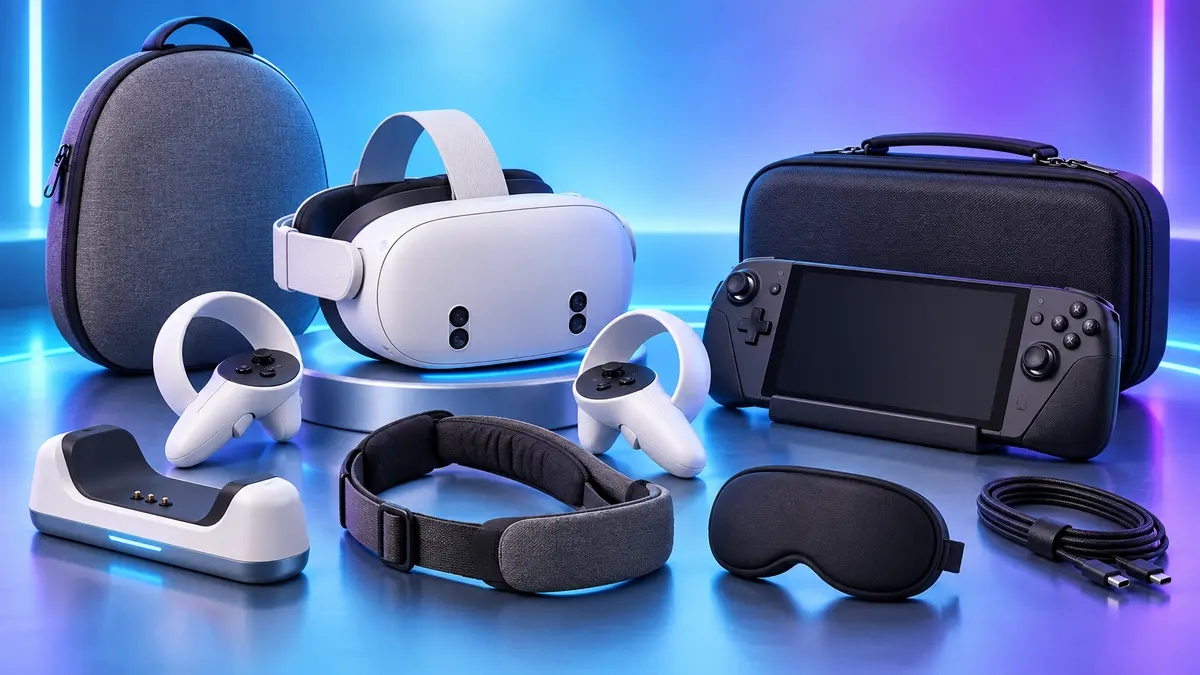
VR headsets and handheld gaming devices are designed for movement, portability and close physical contact. That makes comfort, protection and charging especially important. The right accessories can reduce wear, keep equipment organized and make longer gaming sessions more comfortable. This guide explains what to prioritize and how to avoid common compatibility mistakes.
Compatibility Matters More Than Appearance
VR and handheld accessories often look universal, but small differences in dimensions, camera positions, ventilation openings and controller shapes can affect fit. Before buying, confirm the exact headset or handheld model, including generation and version.
A protective shell should not cover vents. A lens cover should fit without touching delicate lens surfaces. A dock must align with the charging port, and a carrying case needs enough internal space for the device with any installed grip or strap. Read the complete compatibility information before ordering.
1. VR Head Straps and Comfort Accessories
A balanced head strap can reduce pressure on the face and help keep the headset stable. Adjustable top straps and rear supports distribute weight more evenly than a simple elastic strap. For shared headsets, easy adjustment is particularly useful.
Face cushions and washable covers improve hygiene and comfort. Choose materials that are easy to clean and do not block ventilation. Accessories should fit securely without interfering with tracking cameras or preventing the headset from sitting at the correct viewing angle.
2. Lens Protection and Cleaning
VR lenses should be protected from dust, scratches and direct sunlight when the headset is not in use. A soft lens cover provides a physical barrier during storage. Use a clean microfiber cloth for routine cleaning and avoid abrasive materials or strong household cleaners.
Prescription lens inserts or protective lens frames can help some users, but they must be designed for the exact headset. Avoid placing loose objects inside the headset because they may contact the lenses when the device is moved.
3. Controller Grips, Straps and Protective Covers
VR controller grips improve traction and may include adjustable hand straps, allowing users to relax their grip without dropping the controllers. Protective rings or covers can reduce scratches during active games, but they must not block tracking lights or sensors.
Check that all buttons remain accessible and that the cover cannot rotate during play. Straps should be adjustable, comfortable and firmly attached. Inspect them regularly for wear, especially when the headset is used by several people.
4. Charging Docks and Cable Organization
A charging dock keeps the headset and controllers together and ready for the next session. Some docks require rechargeable controller batteries or special battery covers, so confirm what is included. The equipment should sit securely and connect without force.
For cable charging, route cables away from walking areas and active play spaces. Reusable ties and wall clips help reduce tangles. Use the recommended charging specifications and allow devices to cool before storing them inside a closed case.
5. Carrying Cases for VR Headsets
A VR carrying case should support the headset without pressing against the lenses or facial interface. Separate controller compartments prevent hard surfaces from rubbing against the headset. A semi-hard exterior provides useful protection without excessive weight.
If you use an upgraded head strap, measure the complete setup before choosing a case. Standard cases may be too small for larger straps or battery attachments. Look for organized storage for the charging cable, adapter and cleaning cloth.
6. Handheld Gaming Cases and Screen Protection
Handheld gaming devices benefit from the same basic protection as other portable electronics: a fitted shell, screen protector and carrying case. Heavier handheld PCs need a case with good structural support and a secure handle.
Choose a shell that leaves vents, speakers, triggers and memory-card slots accessible. If the device uses a dock, check whether it can remain dock-compatible with the case installed. A screen protector should match the screen dimensions and front camera or sensor layout.
7. Handheld Docks, Stands and Grips
A dock can connect a handheld device to power, a display and other accessories, while a simple stand improves viewing angles for tabletop play. Port selection and power requirements vary, so confirm what the dock supports before connecting external displays or storage.
Ergonomic grips can improve comfort but also increase the device’s overall size. If you travel frequently, make sure the fitted grip still works with your carrying case. Stands should have a stable base and should not block cooling vents.
8. Heat, Ventilation and Safe Storage
Do not cover ventilation openings with cases, stands or decorative accessories. Allow devices to cool after demanding games before placing them in a closed case. Store VR headsets away from direct sunlight, heat and moisture.
Keep charging cables loosely coiled and inspect connectors for damage. A clean, ventilated storage area protects both the electronics and the soft materials used in straps and face cushions.
Accessory Priorities by Use Case
For Home VR
Start with a comfortable head strap, controller grips, lens cover and organized charging area. Add a dock if several components need regular charging.
For VR Travel
Prioritize a properly sized semi-hard case, lens protection and separate controller storage. Pack cables so connectors cannot touch the lenses.
For Handheld Gaming
Begin with a screen protector, protective shell and carrying case. Add a stand, dock or ergonomic grip according to where you play most often.
VR and Handheld Accessory Buying Checklist
- Confirm the exact device generation and dimensions.
- Keep cameras, sensors, speakers and ventilation openings clear.
- Check whether installed straps or grips fit inside the carrying case.
- Verify dock ports, charging input and included accessories.
- Choose washable or easy-to-clean contact surfaces.
- Protect VR lenses from scratches and direct sunlight.
Frequently Asked Questions
What VR accessory should I buy first?
A lens cover and properly sized carrying case provide basic protection. If comfort is a problem, an adjustable head strap is usually the next practical upgrade.
Can a VR controller cover affect tracking?
It can if it blocks tracking lights, sensors or cameras. Choose a cover designed for your exact controller and install it according to the product instructions.
Do handheld console cases block cooling?
A well-designed case should leave all ventilation openings clear. Stop using any case that traps excessive heat or obstructs airflow.
Can I store a VR headset immediately after use?
Allow it to cool and wipe away moisture first. Then fit the lens cover and place the headset in a clean, dry case away from direct sunlight.
Protect Your Equipment and Play More Comfortably
Choose accessories around four priorities: compatibility, protection, comfort and charging. Start with the products that solve a real problem, and confirm the device model before ordering. Explore our VR, handheld and mobile accessories for storage, charging and protection solutions.
Compatibility note: Product names are used to describe device compatibility. Always confirm the exact model before purchase.
